My Profile
Manage your personal profile, credentials, security credentials, Multi-Factor Auth (MFA), and personal tokens.
Overview
The My Profile page allows every authenticated user to manage their personal account information, contact details, profile image, and security settings.
Unlike administrative pages, My Profile is available to all users regardless of their role. It provides a secure and centralized location where users can maintain their personal information and strengthen account security through Multi-Factor Authentication (2FA).
The page is divided into two sections:
- Profile Details
- Security & 2FA
Profile Details
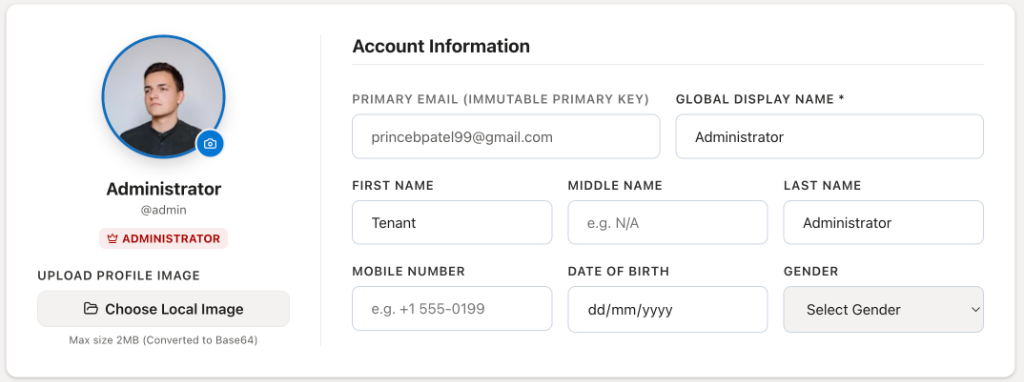
The Profile Details section allows users to view and update their personal information associated with their CoconutDB account.
This information is used throughout the platform for user identification, audit logs, notifications, and account management.
Profile Information
The left panel displays the user's identity information, including:
- Profile Picture
- Display Name
- Username
- Assigned Role
Users can upload or replace their profile picture at any time.
Security & 2FA
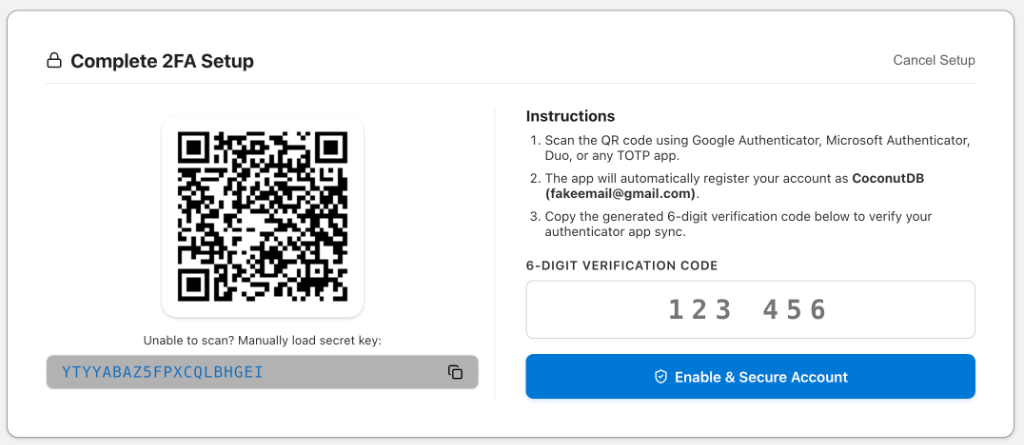
The Security & 2FA section allows users to strengthen account security by enabling Time-based One-Time Password (TOTP) authentication.
When Multi-Factor Authentication is enabled, users must provide both their password and a temporary verification code generated by an authenticator application during sign-in.
This significantly reduces the risk of unauthorized account access.