Push Notification Services
Configure FCM, APNS, and Web Push credentials to broadcast real-time messages to users.
Overview
The Push Notifications module enables Workspace Administrators to send real-time browser notifications to users connected to the workspace.
Using persistent WebSocket connections, CoconutDB can instantly deliver notifications without requiring users to refresh the application. Notifications can be broadcast to all connected users or targeted to specific recipients based on registered devices or email addresses.
This feature is ideal for applications that require immediate communication, alerts, or live updates.
Why Use Push Notifications?
Traditional web applications require users to periodically refresh pages to check for updates.
With WebSocket-based push notifications, CoconutDB delivers messages instantly to connected browsers, providing a faster and more interactive user experience.
Typical use cases include:
- Task assignments
- Approval requests
- Workflow completion alerts
- System announcements
- Order or ticket updates
- Security alerts
- Maintenance notifications
- Real-time application events
Registered Devices
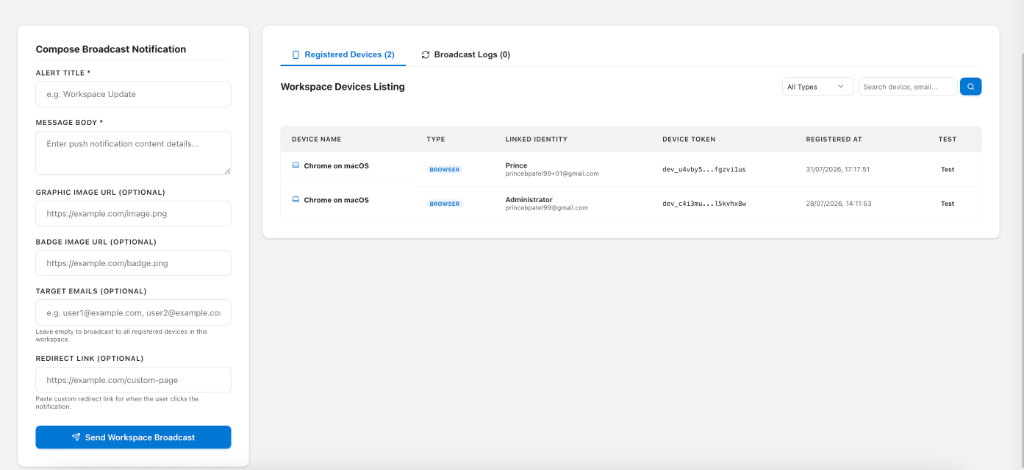
The Registered Devices section displays all browser sessions that are currently registered to receive notifications.
For each registered device, administrators can view:
- Device Name
- Device Type
- Linked User Identity
- Device Token
- Registration Date
This information helps administrators verify which users are capable of receiving real-time notifications.
Broadcasting Notifications
Administrators can compose and send notifications directly from the Push Notifications page.
The notification composer supports:
| Field | Description |
|---|---|
| Alert Title | Title displayed in the notification. |
| Message Body | Main notification content. |
| Graphic Image URL (Optional) | Image displayed within the notification. |
| Badge Image URL (Optional) | Small icon or badge shown with the notification. |
| Target Emails (Optional) | Send to specific users. Leave blank to broadcast to all registered devices. |
| Redirect Link (Optional) | URL opened when the user clicks the notification. |
Broadcast Options
Notifications can be delivered in two ways:
Workspace Broadcast
If no target email addresses are provided, the notification is delivered to all registered devices within the workspace.
This is useful for:
- System maintenance announcements
- Company-wide updates
- Emergency notifications
- Product releases
Targeted Notifications
Administrators can specify one or more email addresses to send notifications only to selected users.
This is useful for:
- Approval requests
- Individual task assignments
- Personal reminders
- Customer-specific updates
- Team-specific announcements
Broadcast History
The Broadcast Logs tab maintains a history of previously sent notifications.
Administrators can review past broadcasts for operational visibility and troubleshooting.
Typical information includes:
- Notification title
- Delivery time
- Sender
- Recipient scope
- Delivery status
WebSocket-Based Delivery
CoconutDB uses WebSocket connections to deliver notifications in real time.
Once a user opens the application, their browser establishes a persistent connection with the server. Whenever a notification is sent, it is pushed immediately to connected devices without requiring page refreshes or repeated polling.
This provides:
- Instant delivery
- Reduced network overhead
- Faster user response times
- Improved application responsiveness