Site Workflows
Build trigger-action automations, database hooks, and real-time webhook broadcasts.
Overview
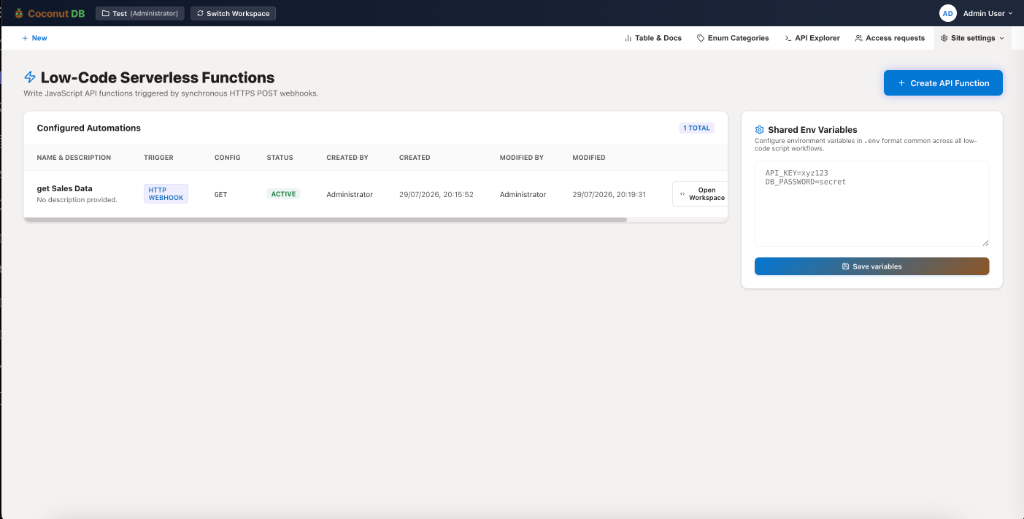
The Site Workflows module enables developers to build server-side automation using JavaScript without managing servers or deployment infrastructure.
Each workflow runs as a secure, serverless function that executes in response to predefined triggers such as HTTP requests, scheduled events, or system events. Workflows can interact with CoconutDB tables, document vaults, REST APIs, email services, push notifications, and external systems.
By combining serverless execution with built-in integrations, Site Workflows allow organizations to automate business processes, implement custom backend logic, and integrate external services while reducing infrastructure complexity.
Why Use Site Workflows?
Instead of building and hosting separate backend services, developers can write JavaScript directly within CoconutDB and execute it whenever a business event occurs.
Typical use cases include:
- Send emails after payment confirmation
- Process uploaded documents
- Synchronize data with third-party systems
- Generate reports
- Execute background jobs
- Validate incoming data
- Trigger approval workflows
- Integrate external APIs
Workflow Triggers
Each workflow begins with a trigger that determines when the function should execute.
CoconutDB currently supports three trigger types.
HTTP Webhook Trigger
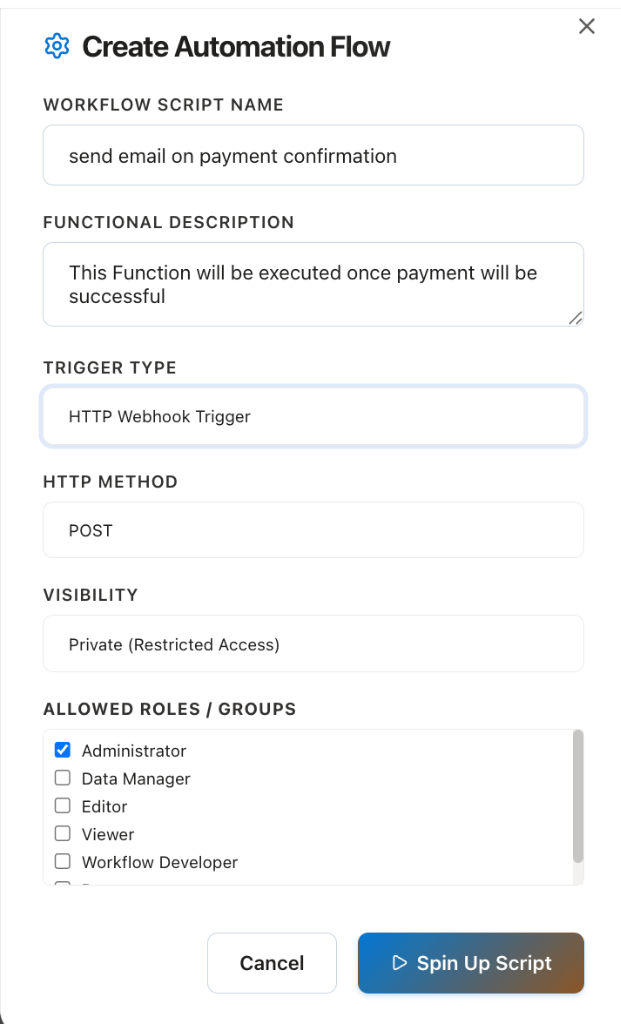
The HTTP Webhook Trigger exposes a secure REST endpoint that executes your JavaScript whenever an HTTP request is received.
After creating and saving the workflow, CoconutDB automatically generates a unique webhook URL that can be called by applications, APIs, or third-party services.
Administrators can control access to the endpoint by configuring its visibility.
Visibility Options
- Public – Accessible without authentication.
- Private – Requires authentication and respects assigned workspace roles.
- Role-Based Access – Only users or API Keys with the configured roles can execute the workflow.
Common use cases include:
- Payment gateway callbacks
- Third-party webhooks
- Custom REST APIs
- Backend business logic
- Form submissions
- Mobile application integrations
Scheduled Trigger
The Scheduled Trigger executes a workflow automatically at predefined intervals without requiring an incoming request.
Administrators can configure schedules such as:
- Every hour
- Daily
- Weekly
- Monthly
- Custom cron expressions (where supported)
This is ideal for recurring background tasks.
Common use cases include:
- Daily report generation
- Database cleanup
- Backup operations
- Email reminders
- Scheduled synchronizations
- Cache refresh
- Data imports
System Webhook Trigger
The System Webhook Trigger executes automatically whenever specific events occur within CoconutDB.
These events are generated by the platform and require no external HTTP requests.
Typical events include:
- Record Created
- Record Updated
- Record Deleted
- Document Uploaded
- Document Deleted
- User Registered
- Workflow Completed
- Other supported system events
This enables event-driven automation directly within the platform.
Common use cases include:
- Send an email when a new order is created
- Notify managers after record approval
- Synchronize data with external systems
- Update related tables automatically
- Trigger downstream workflows
Code Editor
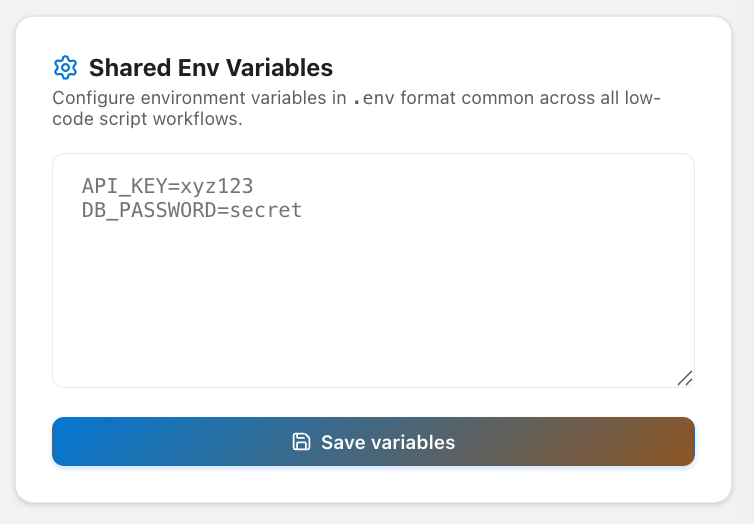
Every workflow includes a built-in JavaScript editor where developers implement server-side logic.
The execution environment provides helper functions and built-in platform services, allowing workflows to interact with CoconutDB resources without extensive setup.
Typical capabilities include:
- Query database tables
- Read request data
- Call external REST APIs
- Send emails
- Generate push notifications
- Access environment variables
- Return HTTP responses
Developers simply write the business logic and save the workflow. CoconutDB handles deployment and execution automatically.
Shared Environment Variables
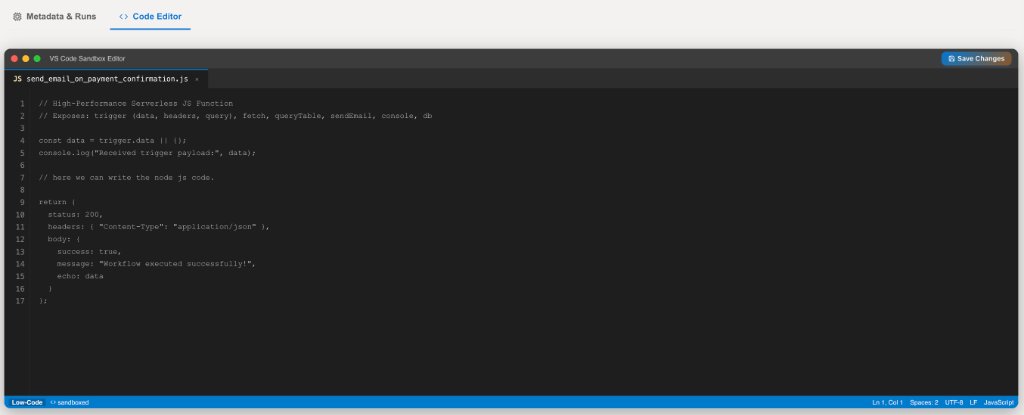
The Shared Environment Variables section provides a centralized location for storing configuration values used across multiple workflows.
Variables follow the standard .env format.
Example:
`API_KEY=xyz123` `PAYMENT_SECRET=********` `CRM_BASE_URL=https://api.company.com`
These variables are securely available to every workflow within the workspace, eliminating the need to duplicate configuration across scripts.
Typical Uses:
- API Keys
- Database credentials
- Third-party service tokens
- Application URLs
- Configuration values
- Feature flags
Workflow Metadata
Each workflow maintains configuration information including:
- Workflow Name
- Description
- Trigger Type
- HTTP Method (where applicable)
- Visibility
- Allowed Roles
- Generated Endpoint URL
- Status (Active or Paused)
Administrators can update these settings at any time without modifying the workflow code.
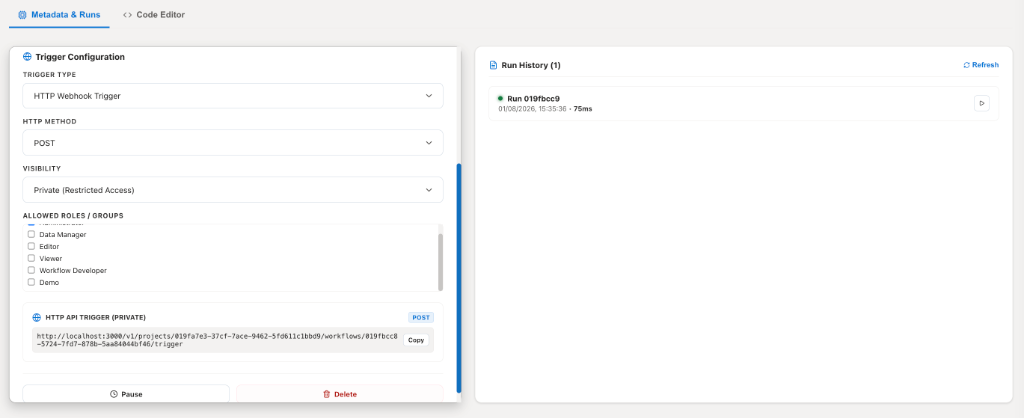
Run History
Every workflow execution is recorded in the Run History.
For each execution, administrators can review:
- Execution Time
- Run Status
- Execution Duration
- Trigger Source
- Request Details
- Response Details
- Error Information (if applicable)
Run History simplifies troubleshooting and provides operational visibility into workflow activity.
Security
Site Workflows integrate directly with CoconutDB's security model.
Depending on the trigger type, workflows can be protected using:
- Workspace Authentication
- Role-Based Access Control (RBAC)
- Developer API Keys
- Private Webhook Endpoints
- Public Endpoints (when explicitly enabled)
This ensures only authorized users or systems can execute sensitive workflows.