User Registration
Register for CoconutDB using either email/password or Single Sign-On (SSO).
Overview
Users can register for CoconutDB using either email/password or Single Sign-On (SSO).
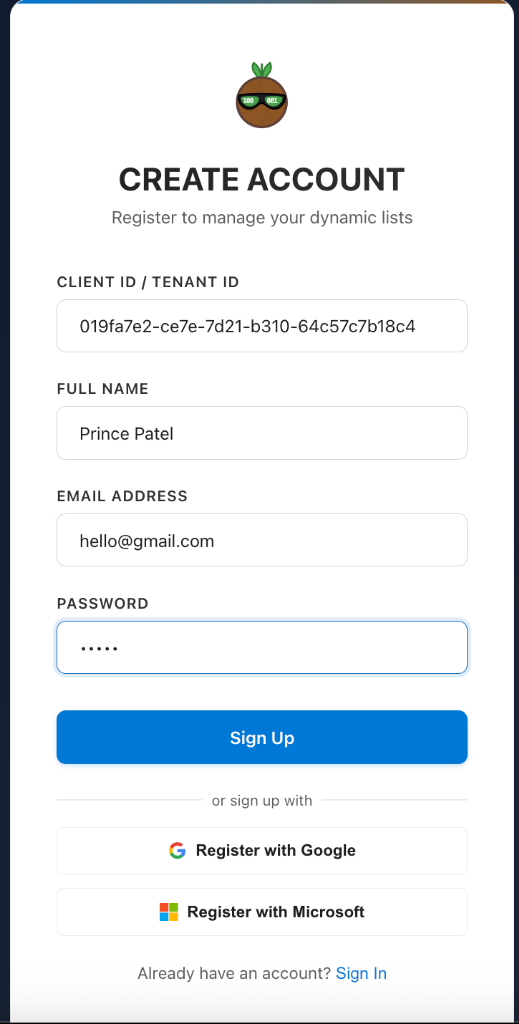
Register with Email
To create an account, the registration form requires the following information:
- Client ID (Tenant ID)
- Full Name
- Email Address
- Password
The Client ID identifies the tenant that the user belongs to. If you are building your own application or framework on top of CoconutDB, you can store the Client ID in your application's configuration (for example, in the .env file). This allows users to register by entering only their name, email address, and password, while the application automatically supplies the Client ID.
After submitting the registration form, CoconutDB sends a One-Time Password (OTP) to the user's registered email address. The user must successfully verify the OTP before the account is activated. This email verification ensures that only valid email addresses can be used to create accounts.
Register with Single Sign-On (SSO)
If the Tenant Administrator has configured Single Sign-On, users can also register and sign in using:
- Microsoft Azure Active Directory (Microsoft Entra ID)
With SSO, users authenticate using their existing organizational credentials, eliminating the need to create and manage a separate CoconutDB password. This provides a faster and more secure registration experience while integrating seamlessly with the organization's identity provider.