Developer API Keys
Generate and rotate public/private keys with IP restrictions, rate limits, and scopes.
Overview
The Developer API Keys module allows Workspace Administrators to generate long-lived authentication credentials for applications, backend services, automation scripts, and system integrations.
Unlike user authentication tokens (JWTs), Developer API Keys do not expire after a short period and do not require periodic re-authentication. This makes them ideal for server-to-server communication, scheduled jobs, CI/CD pipelines, and other unattended processes.
Each API Key is assigned one or more workspace roles, ensuring that every API request is authorized according to the permissions granted to that key.
Why Use Developer API Keys?
Applications and backend services often need to access CoconutDB APIs without requiring a user to log in repeatedly.
Developer API Keys eliminate the need to continuously generate and refresh JWT access tokens, providing a reliable authentication mechanism for long-running integrations.
Typical use cases include:
- Backend APIs
- Microservices
- Scheduled jobs (Cron Jobs)
- CI/CD pipelines
- Automation scripts
- Third-party integrations
- Server-to-server communication
- AI agents and background workers
Creating an API Key
To generate a new Developer API Key:
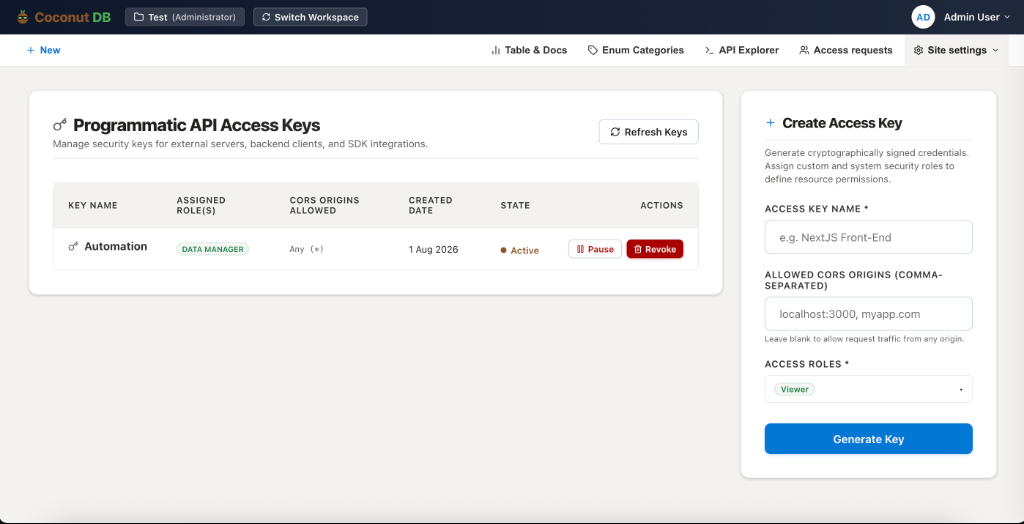
- Navigate to Site Settings → Developer API Keys.
- Enter a descriptive Access Key Name.
- Configure the allowed CORS Origins (optional).
- Assign one or more workspace roles.
- Click Generate Key.
CoconutDB securely generates a cryptographically signed API key.
Role-Based Access Control
Every Developer API Key inherits the permissions of the roles assigned during creation.
The key can only perform operations that those roles are authorized to execute.
For example:
| Assigned Role | Permissions |
|---|---|
| Viewer | Read-only access to permitted resources |
| Editor | Read and modify business records |
| Data Manager | Manage schemas, tables, and registry settings |
| Administrator | Full workspace access |
This ensures API integrations follow the same Role-Based Access Control (RBAC) model as interactive users.
One-Time Secret Display
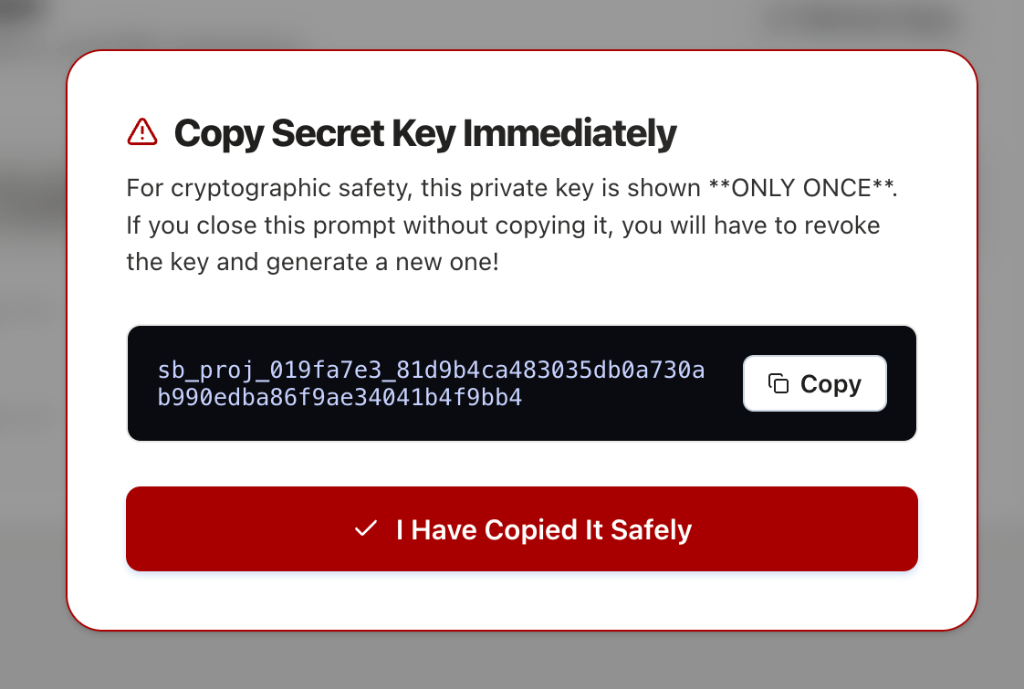
For security reasons, the generated secret key is displayed only once immediately after creation.
After the dialog is closed, the secret cannot be viewed again.
If the key is lost, it must be revoked and a new key generated.
Important
Store the secret key securely in a password manager or secret management solution before closing the dialog.
CORS Origin Restrictions
Each API Key can optionally be restricted to specific browser origins.
Only requests originating from the configured domains are permitted to use the key.
Example:
`localhost:3000, app.company.com`
Leaving this field blank allows requests from any origin.
Key Management
Administrators can manage Developer API Keys throughout their lifecycle.
Available actions include:
- Generate new keys
- Pause a key temporarily
- Reactivate a paused key
- Revoke a key permanently
- Review assigned roles
- View creation date and status
Revoked keys can no longer authenticate API requests.
Audit Identity
Every action performed using a Developer API Key is recorded in CoconutDB's audit logs.
For accountability and traceability, all operations are attributed to the workspace member who created the key, rather than to an anonymous system account.
This provides a clear audit trail for compliance, security reviews, and operational investigations.