SSO Configuration
Configure Single Sign-On (SSO) and CAPTCHA security protections.
Overview
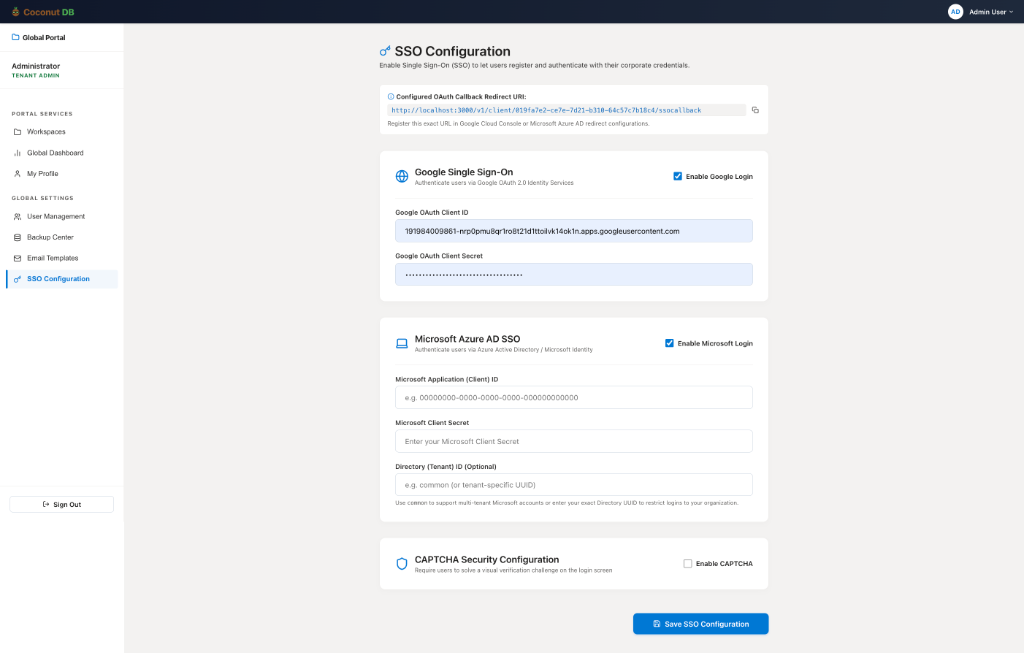
The SSO (Single Sign-On) Configuration page allows Tenant Administrators to enable enterprise authentication for CoconutDB using external identity providers such as Google and Microsoft Azure Active Directory (Azure AD).
Instead of requiring users to create and manage separate CoconutDB passwords, users can securely sign in using their existing corporate or organizational accounts.
The page also includes CAPTCHA Security Configuration, which provides an additional layer of protection for traditional email/password authentication.
Supported Identity Providers
CoconutDB currently supports authentication through:
- Google Single Sign-On (OAuth 2.0)
- Microsoft Azure Active Directory (Microsoft Entra ID)
Each provider can be enabled or disabled independently, allowing organizations to choose the authentication methods that best fit their environment.
OAuth Callback URL
At the top of the page, CoconutDB displays the OAuth Callback Redirect URL.
This URL must be registered in the OAuth application configuration of the selected identity provider (Google Cloud Console or Microsoft Azure Portal).
After a user successfully authenticates with the identity provider, they are securely redirected back to CoconutDB through this callback URL to complete the sign-in process.
Google Single Sign-On
Tenant Administrators can enable Google authentication by providing the required OAuth credentials.
Configuration includes:
- Enable or disable Google Login
- Google OAuth Client ID
- Google OAuth Client Secret
Once configured and enabled, users can sign in to CoconutDB using their Google account without creating or managing a separate CoconutDB password. This is particularly useful for organizations using Google Workspace.
Microsoft Azure Active Directory SSO
Organizations using Microsoft 365 or Microsoft Entra ID can configure Azure Active Directory authentication.
The required configuration includes:
- Enable or disable Microsoft Login
- Microsoft Application (Client) ID
- Microsoft Client Secret
- Directory (Tenant) ID (optional)
The Tenant ID can be configured to allow authentication from a specific Microsoft tenant (single-tenant), or use the common endpoint to support users from multiple Microsoft organizations (multi-tenant).
Once configured, users can securely sign in using their Microsoft corporate accounts.
CAPTCHA Security Configuration
CoconutDB also provides an optional CAPTCHA Security feature to protect traditional username and password authentication.
When CAPTCHA is enabled, users signing in with email and password must successfully complete the CAPTCHA challenge before authentication is processed. This helps prevent automated login attempts, credential stuffing, and brute-force attacks.
CAPTCHA and SSO Authentication
CAPTCHA is only applied to email/password authentication. Users signing in through Google SSO or Microsoft Azure AD SSO are not required to solve a CAPTCHA, as authentication is delegated to the trusted identity provider.
This provides both strong security and a seamless sign-in experience.