Tables & Data Management
Design data schemas, configure columns and edit records.
Overview
Tables are the core building blocks of data storage in CoconutDB. Every application stores its business information inside one or more tables, where each table represents a specific business entity such as Customers, Products, Orders, Employees, or Projects.
Unlike traditional database platforms, CoconutDB automatically generates a complete set of secure REST APIs for every table you create. This eliminates the need to manually develop CRUD operations, allowing developers to focus on application logic rather than backend infrastructure.
Each table supports customizable columns, multiple data types, indexing, Row-Level Security (RLS), version history, audit tracking, and automatic API generation.
Creating a Table
Creating a table is straightforward and requires no SQL knowledge.
To create a new table:
- Open the desired workspace.
- Navigate to '+ New'
- Click New Table.
- Enter a table name.
- Provide an optional description.
- Define one or more columns.
- Configure the required column settings.
- Click Save.
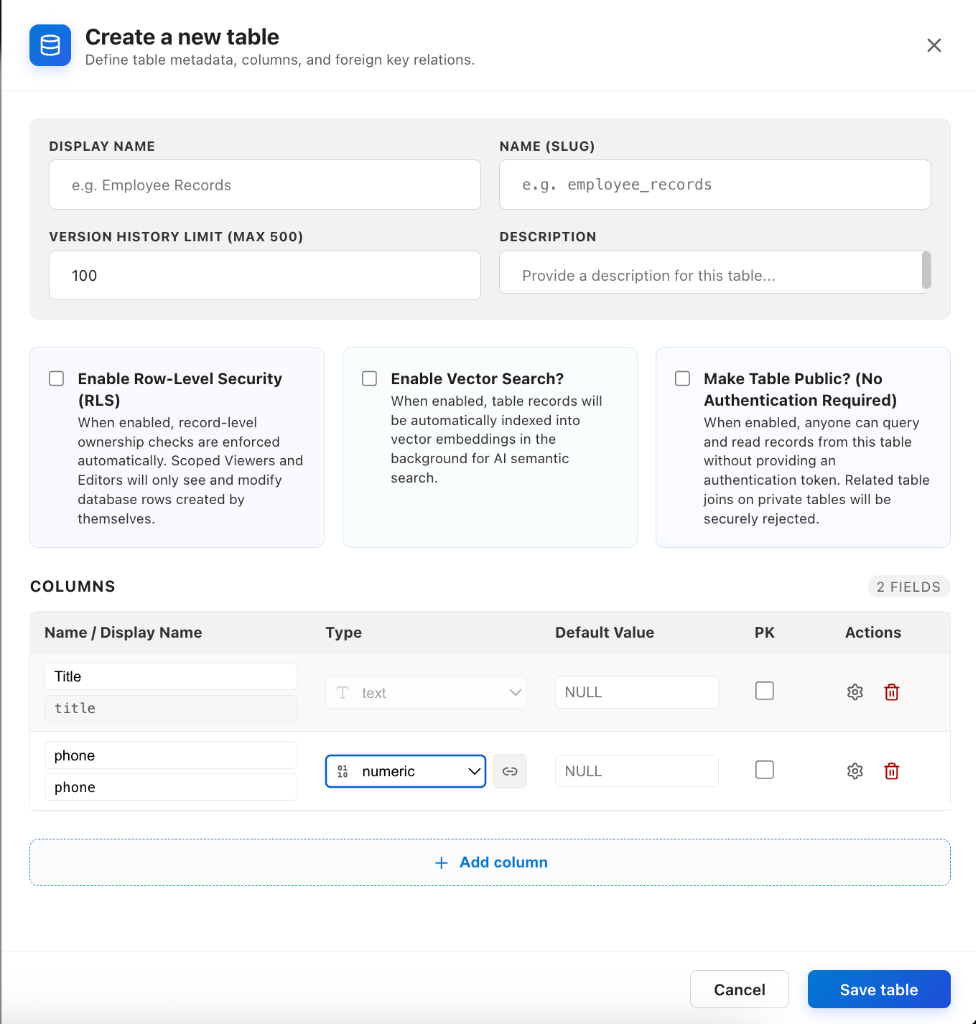
Once created, CoconutDB automatically provisions the database schema and generates the associated REST API endpoints.
Table Structure
Each table consists of:
- Table Name
- Description
- Columns
- Records
- Access Policies
- Auto-generated APIs
- Audit History
A well-designed table should represent a single business entity and contain only the information related to that entity.
Column Configuration
Columns define the structure of your data.
When creating a column, you can specify:
- Column Name
- Data Type
- Required or Optional
- Unique Constraint
- Indexed Status
These settings determine how data is stored, validated, and queried.
Supported Data Types
CoconutDB provides several built-in data types to support different kinds of application data.
Numeric Types
| Data Type | Description | Example Use Cases |
|---|---|---|
| int2 (smallint) | 2-byte signed integer (-32,768 to 32,767). | Age, Rating, Status Code |
| int4 (integer) | Standard 4-byte signed integer. | Employee ID, Quantity, Order Number |
| int8 (bigint) | 8-byte signed integer for very large numbers. | Large Counters, Transaction IDs |
| float4 (real) | Single-precision floating-point number. | Sensor Values, Approximate Measurements |
| float8 (double precision) | Double-precision floating-point number. | Scientific Calculations, Analytics |
| numeric | High-precision numeric value with configurable precision and scale. | Financial Calculations |
| decimal (18,2) | Fixed precision decimal value with two decimal places. | Currency, Prices, Tax Amounts |
Text & JSON Types
| Data Type | Description | Example Use Cases |
|---|---|---|
| text | Stores unlimited-length text values. | Description, Comments, Notes |
| varchar | Variable-length text with an optional maximum length. | Name, Email Address, Phone Number |
| json | Stores JSON documents as plain text while preserving JSON syntax. | API Payloads, Configuration Data |
| jsonb | Binary JSON format optimized for indexing and querying. | Dynamic Application Data, Metadata |
Date & Time Types
| Data Type | Description | Example Use Cases |
|---|---|---|
| date | Stores calendar dates without time. | Birth Date, Invoice Date |
| time | Stores time without a date. | Office Hours, Meeting Time |
| timetz | Stores time with time zone information. | Global Scheduling |
| timestamp | Stores both date and time. | Created Date, Updated Date |
| timestamptz | Stores date and time with time zone support. | Audit Logs, Global Applications |
Boolean, UUID & Spatial Types
| Data Type | Description | Example Use Cases |
|---|---|---|
| bool (boolean) | Stores true or false values. | Active Status, Enabled Flag |
| uuid | Universally Unique Identifier. | Primary Keys, API Identifiers |
| bytea | Stores binary data. | Images, Digital Signatures, Encrypted Files |
| geography | Stores geographic coordinates and spatial data. | Maps, Delivery Tracking, Geofencing |
| point | Represents a two-dimensional point. | Coordinates, Locations |
Enumerated Types
| Data Type | Description | Example Use Cases |
|---|---|---|
| enum | Restricts values to a predefined list of options. | Status, Priority, Department, Category |
Selecting the appropriate data type ensures data consistency and improves application reliability.
Column Options
Each column can be configured with additional options to improve data quality and performance.
Is Nullable
Allows the column to store NULL (empty) values.
Use when: The field is optional (e.g., Middle Name, Remarks).
Is Unique
Ensures every value in the column is unique across all records.
Use when: Storing identifiers such as Email Address, Employee ID, or Product Code.
Is Indexed
Creates a database index to improve query performance for searches, filters, and sorting.
Use when: The column is frequently used in search or filter operations.
Define as Array
Allows the column to store multiple values of the same data type.
Use when: Storing tags, skills, categories, or multiple phone numbers.
Is Masked
Masks sensitive data when displayed to unauthorized users, protecting confidential information.
Use when: Storing passwords, API keys, credit card numbers, Aadhaar/PAN numbers, or other sensitive data.
What is Row-Level Security (RLS)?
Row-Level Security is a database security paradigm that controls which rows in a table are visible or modifiable by a given user or client request.
Instead of traditional table-level permissions (where a user can either read the entire table or nothing), RLS applies a logical filter to every query executed against the table. The database engine evaluates this filter dynamically for each row based on the security context of the active request.
In CoconutDB:
- RLS policies are represented as SQL Boolean Expressions evaluated inside PostgreSQL USING constraints.
- Whenever a query is run, the engine appends the RLS clause to the statement automatically.
- Only rows matching the boolean condition (i.e. where the filter evaluates to true) are fetched, updated, or deleted.
Setting Up an RLS Policy
When creating or configuring policies via the RLS Drawer, you write a standard SQL condition that refers to the table's fields and the active user's credentials.
Accessing the Active User Context
To build contextual authorization rules, CoconutDB provides access to the following built-in database functions and variables mapping the active user:
| SQL Expression | Return Type | Description |
|---|---|---|
| auth.uid() | UUID | Resolves the UUID of the authenticated user making the API request. |
| current_setting('app.region', true) | String | Resolves the geographical region setting of the active connection session. |
| record (or column names) | Column value | Refers to columns in the row currently being evaluated (e.g. record.project_id, deleted_at). |
SQL Dry-Run Verification
Before registering or applying a new RLS policy, the CoconutDB backend performs a compilation dry-run check.
To prevent invalid expressions (such as syntax errors, type mismatches, or references to columns that do not exist) from breaking production queries:
- The backend starts a database transaction.
- It compiles the proposed expression into a temporary SQL statement.
- It runs a mock query executing the constraint against the physical PostgreSQL table.
- It immediately rolls back the transaction.
If the dry-run check fails, the API returns a detailed 400 Bad Request containing the specific database engine compiler error, ensuring only syntactically sound and valid policies are registered.
Key RLS Expression Patterns
Below are the most common, secure, and production-tested patterns used to restrict access based on roles, soft-deletion state, subscriptions, and cross-table references.
Pattern A: Soft-Deletion Filtering
Ensures that soft-deleted items (where deleted_at is populated) are automatically excluded from lists.
deleted_at IS NULLPattern B: Workspace User Roles Check
Verifies if the active user belongs to the project and holds a specific system role (e.g. role_id = 1 for Administrator, role_id = 2 for Editor, etc.) within the project_users table.
auth.uid() IN (
  SELECT user_id
  FROM project_users
  WHERE project_id = record.project_id
    AND role_id = 1
)
Pattern C: Tenant Access Checks
Restricts row operations so that a user can only interact with rows belonging to their corresponding tenant.
EXISTS (
  SELECT 1
  FROM tenant_members tm
  WHERE tm.tenant_id = record.tenant_id
    AND tm.user_id = auth.uid()
    AND tm.active = true
)
Pattern D: Subscription Validation (Cross-Table Reference)
Blocks reads or writes if the corresponding tenant does not have an active subscription package or if the subscription has expired.
EXISTS (
  SELECT 1
  FROM subscriptions s
  WHERE s.tenant_id = record.tenant_id
    AND s.status = 'active'
    AND now() < s.expires_at
)
Pattern E: Feature Flag Checks
Allows queries only if a specific feature flag (e.g., document_access) is enabled for the workspace tenant.
EXISTS (
  SELECT 1
  FROM feature_flags f
  WHERE f.tenant_id = record.tenant_id
    AND f.feature_name = 'document_access'
    AND f.enabled = true
)
Pattern F: Region Restrictions with Admin Bypass
Forces local regional constraints on rows (e.g. data residency rules) but bypasses the check if the user is a Global Administrator.
record.region = current_setting('app.region', true)
OR EXISTS (
  SELECT 1
  FROM roles r
  WHERE r.user_id = auth.uid()
    AND r.role = 'GlobalAdmin'
)
More Boolean Expression Examples
Here are additional common real-world SQL configurations you can copy, paste, and modify in the RLS Drawer:
1. Direct Creator Ownership (Self-Service)
Allows users to access only records they created.
created_by = auth.uid()2. Public Read-Only, Admin-Only Write
Allows any user (including guest/anonymous users) to read records, but limits write operations (INSERT, UPDATE, DELETE) to administrators.
For SELECT Policy:
trueFor WRITE Policy:
auth.uid() IN (
  SELECT user_id
  FROM project_users
  WHERE project_id = record.project_id
    AND role_id = 1
)
3. Department-Level Collaboration (Team Scope)
Allows employees to view or edit records created by anyone belonging to the same department.
EXISTS (
  SELECT 1
  FROM employee e_current
  JOIN employee e_record ON e_current.department_id = e_record.department_id
  WHERE e_current.user_id = auth.uid()
    AND e_record.id = record.owner_employee_id
)
4. Sensitive Threshold Filtering
Only workspace Administrators (role 1) are allowed to view records with budgets exceeding $100,000.
record.budget <= 100000
OR auth.uid() IN (
  SELECT user_id
  FROM project_users
  WHERE project_id = record.project_id
    AND role_id = 1
)
5. Time-Window Based Enforcement
Restricts actions (like deletions or inserts) to standard business hours (Monday to Friday, 9:00 AM to 5:00 PM server time).
EXTRACT(DOW FROM now()) BETWEEN 1 AND 5
AND EXTRACT(HOUR FROM now()) BETWEEN 9 AND 17
Composition (Combining Constraints)
You can chain multiple patterns together using standard SQL logical operators (AND, OR, NOT) to construct granular, conditional filters.
Example: Secure Document Access Policy
-- 1. Exclude soft-deleted rows
deleted_at IS NULL
-- 2. AND enforce tenant membership
AND EXISTS (
  SELECT 1
  FROM tenant_members tm
  WHERE tm.tenant_id = record.tenant_id
    AND tm.user_id = auth.uid()
    AND tm.active = true
)
-- 3. AND verify active subscription status
AND EXISTS (
  SELECT 1
  FROM subscriptions s
  WHERE s.tenant_id = record.tenant_id
    AND s.status = 'active'
    AND now() < s.expires_at
)
-- 4. AND restrict by region residency or admin role
AND (
  record.region = current_setting('app.region', true)
  OR EXISTS (
    SELECT 1
    FROM roles r
    WHERE r.user_id = auth.uid()
      AND r.role = 'GlobalAdmin'
  )
)
This composed policy guarantees that even if a developer queries documents globally, the query automatically strips records that are deleted, belong to other tenants, lack active subscriptions, or violate data residency regulations (unless the request is made by a Global Admin).
Managing Records
Once a table has been created, records can be added through the CoconutDB user interface.
Click Add Record to open the record entry form.
After records have been created, they are displayed in a tabular grid where users can:
- View records
- Search records
- Sort records
- Filter records
- Reorder columns
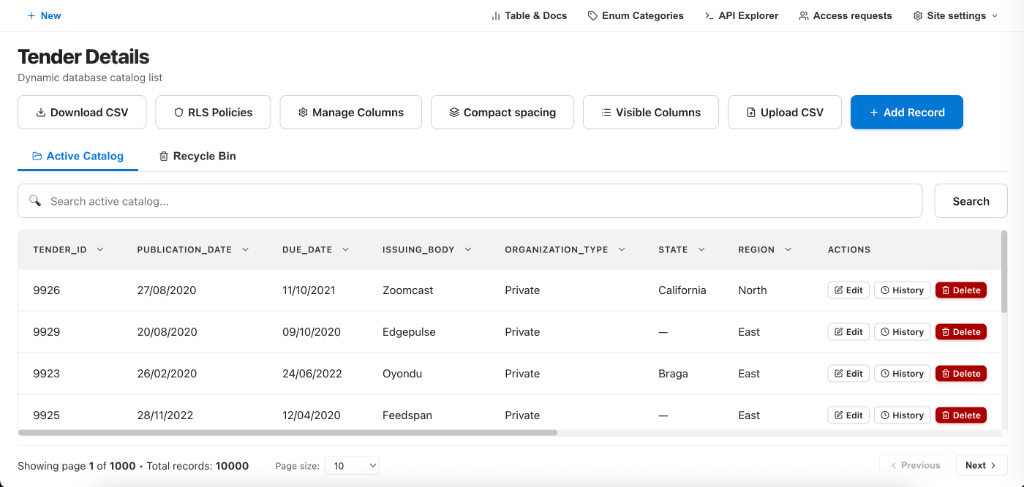
This interface enables users to efficiently manage business data without requiring database knowledge.
Record Actions
Each record provides a set of actions for managing its lifecycle.
Edit
Updates an existing record while preserving its version history.
Soft Delete
Moves the record to the Recycle Bin without permanently removing it.
Soft-deleted records can be restored by Workspace Administrators.
Version History
Displays the complete change history for the selected record.
Version history includes:
- Who modified the record
- When the change occurred
- Previous values
- Updated values
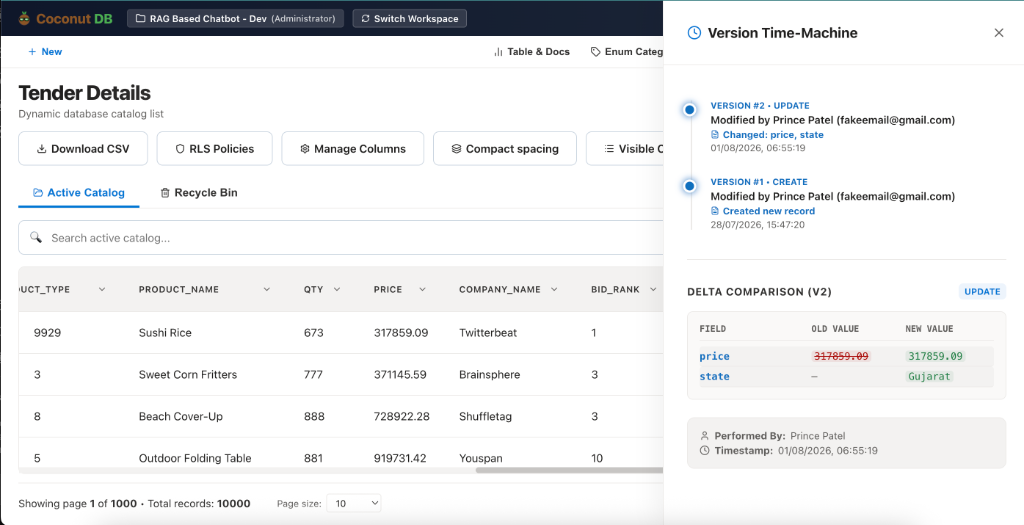
This provides complete traceability for data changes and supports audit requirements.
Managing Columns
Business requirements evolve over time.
CoconutDB allows Workspace Administrators to modify the database schema without manually writing migration scripts.
Administrators can:
- Add new columns
- Rename existing columns
- Update column settings
- Remove unused columns
Schema updates become available immediately after saving.
Dynamic CRUD & Query Engine API Reference
This section provides a detailed specification of the dynamic database table CRUD and Abstract Syntax Tree (AST) query engine endpoints in CoconutDB.
Global Headers Context
All API requests against dynamic resources expect the following header context to establish proper tenant sandboxing and client authorization:
| Header | Type | Required | Description |
|---|---|---|---|
| Authorization | String | Yes | Bearer Token: JWT authentication token (Bearer <token>). |
| X-Project-Id | UUID | Yes | Active workspace project identifier establishing table schema context. |
| X-Client-Id | String | No | Client application ID tracking API logs and statistics. |
1. JSON Relation Query (AST)
Method: POST | Path: /v1/:resource/query
Required Headers: X-HTTP-Method-Override: QUERY
Executes a structured JSON relation query parsing AST logic. Evaluates Row-Level Security (RLS) constraints, performs recursive relational joins (Lookups/Foreign Keys), applies pagination, sorting, and nested conditional filtering.
{
  "from": "leads",
  "select": [
    { "field": "id" },
    { "field": "first_name" },
    { "field": "last_name" },
    {
      "relation": "department",
      "select": [
        { "field": "name" },
        { "field": "code" }
      ]
    }
  ],
  "where": {
    "and": [
      { "status": { "eq": "Active" } },
      { "created_at": { "gte": "2026-01-01T00:00:00Z" } }
    ]
  },
  "orderBy": [
    { "field": "created_at", "direction": "DESC" }
  ],
  "limit": 10,
  "page": 1
}{
"success": true,
"data": [
{
"id": "019fbaf9-45e1-7d67-99c1-fca53fe1e31d",
"first_name": "John",
"last_name": "Doe",
"department": {
"name": "Engineering",
"code": "ENG"
}
}
],
"pagination": {
"total": 142,
"page": 1,
"limit": 10,
"pages": 15
}
}2. Database-Level Grouped Aggregations (AST)
Method: POST | Path: /v1/:resource/query
Required Headers: X-HTTP-Method-Override: QUERY
Group records by specified columns and compute database-level aggregates such as count, avg, min, max, and sum. Supports having filtering on computed metrics.
{
  "from": "leads",
  "where": {
    "and": [
      { "is_deleted": { "eq": false } }
    ]
  },
  "groupBy": ["status", "department.name"],
  "aggregates": [
    { "function": "count", "field": "id", "alias": "leadCount" },
    { "function": "avg", "field": "score", "alias": "avgScore" }
  ],
  "having": {
    "leadCount": { "gt": 5 }
  },
  "orderBy": [
    { "field": "leadCount", "direction": "DESC" }
  ],
  "page": 1,
  "limit": 10
}{
"success": true,
"data": [
{
"status": "Contacted",
"department": {
"name": "Sales"
},
"leadCount": 18,
"avgScore": 84.5
}
],
"pagination": {
"total": 1,
"page": 1,
"limit": 10,
"pages": 1
}
}3. Retrieve One Record
Method: GET | Path: /v1/:resource/:id
Fetches a single record by its primary key UUID. Automatically resolves and formats joined enum categories or inline lookups.
{
  "success": true,
  "data": {
    "id": "019fbaf9-45e1-7d67-99c1-fca53fe1e31d",
    "first_name": "Jane",
    "last_name": "Smith",
    "status": "Active",
    "version": 1,
    "created_at": "2026-07-31T12:00:00.000Z",
    "updated_at": "2026-07-31T12:00:00.000Z"
  }
}
4. Create Record
Method: POST | Path: /v1/:resource
Validates schema constraints (nullability, length, data types, unique indexes) and creates a new database row. Generates default audit tracking fields.
{
  "first_name": "Alice",
  "last_name": "Cooper",
  "email": "alice@cooper.local",
  "score": 95
}{
"success": true,
"data": {
"id": "019fbaff-72a3-76cd-95ba-ccbdbe0a7ba2",
"first_name": "Alice",
"last_name": "Cooper",
"email": "alice@cooper.local",
"score": 95,
"version": 1,
"created_at": "2026-08-01T02:00:00.000Z"
}
}5. Partial Update (Optimistic)
Method: PATCH | Path: /v1/:resource/:id
Partially updates fields on an existing record. To prevent write conflicts in concurrent environments, users can optionally include a query check confirming version history snapshots.
{
  "score": 98,
  "status": "Converted"
}{
"success": true,
"data": {
"id": "019fbaff-72a3-76cd-95ba-ccbdbe0a7ba2",
"first_name": "Alice",
"last_name": "Cooper",
"score": 98,
"status": "Converted",
"version": 2,
"updated_at": "2026-08-01T02:05:00.000Z"
}
}6. Soft Delete Record
Method: DELETE | Path: /v1/:resource/:id
Sets the is_deleted column to true or populates a deleted_at timestamp. Soft-deleted records are automatically filtered out from normal select queries but preserved for audit/timeline recovery.
{
  "success": true,
  "message": "Record successfully moved to recycle bin."
}
7. Restore Soft-Deleted
Method: POST | Path: /v1/:resource/:id/restore
Recovers a soft-deleted item from the recycle bin, clearing the deletion flag and incrementing its audit version.
{
  "success": true,
  "message": "Record successfully restored to active state."
}
8. Hard Delete (Admin Only)
Method: DELETE | Path: /v1/:resource/:id
Query Parameter: hard=true
Permanently purges a record from the database table. Requires Administrator or system scopes.
{
  "success": true,
  "message": "Record permanently deleted from storage."
}
9. Bulk Create / Upsert
Method: POST | Path: /v1/:resource/bulk
Performs transactional bulk inserts of arrays of items. Optional upsert modes execute conflict updates on matching index fields.
{
  "items": [
    { "first_name": "Charlie", "last_name": "Brown" },
    { "first_name": "Snoopy", "last_name": "Beagle" }
  ]
}{
"success": true,
"count": 2,
"inserted_ids": [
"019fbbb1-7a6c-72df-ba8c-3221ea3a6ba2",
"019fbbb1-7a70-73d0-bb2e-3324ec3be8ab"
]
}10. Bulk Update
Method: PATCH | Path: /v1/:resource/bulk
Transactional update matching multiple items by primary key or conditions.
{
  "items": [
    { "id": "019fbbb1-7a6c-72df-ba8c-3221ea3a6ba2", "status": "Inactive" },
    { "id": "019fbbb1-7a70-73d0-bb2e-3324ec3be8ab", "status": "Active" }
  ]
}{
"success": true,
"updated_count": 2
}11. Bulk Soft Delete
Method: DELETE | Path: /v1/:resource/bulk
Moves an array of records to the recycle bin transactionally.
{
  "ids": [
    "019fbbb1-7a6c-72df-ba8c-3221ea3a6ba2",
    "019fbbb1-7a70-73d0-bb2e-3324ec3be8ab"
  ]
}{
"success": true,
"deleted_count": 2
}12. Advanced Search
Method: GET | Path: /v1/:resource/search
Query Parameters: q or search (text token matching), vector (boolean cosine-similarity search against embeddings).
Matches items based on text terms or semantic closeness vector metrics.
{
  "success": true,
  "data": [
    {
      "id": "019fbbb1-7a6c-72df-ba8c-3221ea3a6ba2",
      "first_name": "Charlie",
     }
  ]
}
13. Count Matching
Method: GET | Path: /v1/:resource/count
Query Parameters: Standard URI parameter filter key-value pairs (e.g. status=Active&score=gt:90).
Lightweight endpoint returning counts without body overhead.
{
  "success": true,
  "count": 42
}
14. Export CSV / JSON
Method: GET | Path: /v1/:resource/export
Query Parameters: format (csv or json, defaults to json).
Stream-dumps all matching records formatted cleanly. Ideal for spreadsheet integration.
Content-Type: text/csv
Content-Disposition: attachment; filename="export_leads_20260801.csv"
15. Version History Timeline
Method: GET | Path: /v1/:resource/:id/history
Returns all chronological versions of a record showing audit details (e.g., who changed which columns, when, and version increments).
{
  "success": true,
  "timeline": [
    {
      "version": 2,
      "updated_at": "2026-08-01T02:05:00.000Z",
      "updated_by": "019fa2d5-7723-74ed-a8cc-87afbe30faa7",
      "changes": {
        "score": { "old": 95, "new": 98 },
        "status": { "old": "Active", "new": "Converted" }
      }
    },
    {
      "version": 1,
      "updated_at": "2026-08-01T02:00:00.000Z",
      "updated_by": "019fa2d5-7723-74ed-a8cc-87afbe30faa7",
      "changes": null
    }
  ]
}
16. Snapshot Time-Machine
Method: GET | Path: /v1/:resource/:id/history/:versionNumber
Fetches the exact state of a record at a specific version index.
{
  "success": true,
  "data": {
    "id": "019fbaff-72a3-76cd-95ba-ccbdbe0a7ba2",
    "first_name": "Alice",
    "last_name": "Cooper",
    "score": 95,
    "status": "Active",
    "version": 1,
    "updated_at": "2026-08-01T02:00:00.000Z"
  }
}
17. Unique Column Filters
Method: GET | Path: /v1/:resource/filters
Aggregates all distinct values present in every table column. Primarily used to populate client dropdown filter panels dynamically.
{
  "success": true,
  "filters": {
    "status": ["Active", "Inactive", "Converted", "Contacted"],
    "department_name": ["Sales", "Engineering", "Operations"]
  }
}
These APIs follow a consistent structure, making it easy to integrate CoconutDB with web applications, mobile apps, automation platforms, and third-party systems.
Enterprise Features
Tables are designed for enterprise applications and include several built-in governance capabilities.
Automatic Version History
Every record modification is tracked, allowing administrators to review historical changes.
Soft Delete
Records are never immediately removed, reducing the risk of accidental data loss.
Row-Level Security
Restrict record visibility based on user identity or custom security policies.
Audit Trail
Every data modification is recorded to improve accountability and simplify investigations.
Automatic API Generation
Developers can immediately begin integrating applications without writing backend CRUD operations.
Best Practices
When designing tables, consider the following recommendations:
- Create one table for each business entity.
- Use meaningful table and column names.
- Choose the most appropriate data type for each field.
- Apply unique constraints where duplicate values are not permitted.
- Create indexes only for frequently searched columns.
- Enable Row-Level Security when data should be isolated between users.
- Regularly review version history and audit logs for critical business data.
- Avoid storing unrelated information in the same table.