ENUM Category
Configure globally reusable lookup lists for status values, categories, options, and types.
Overview
An ENUM Category (Enumeration) is a reusable collection of predefined values that can be assigned to table columns. Instead of allowing users to enter arbitrary text, an ENUM Category restricts input to a fixed set of approved options, ensuring data consistency and reducing validation errors.
Once an ENUM Category is created, it can be reused across multiple tables and columns within the same workspace.
Why Use ENUM Categories?
Without ENUM Categories, users may enter inconsistent values for the same information.
For example, a Status field might contain:
- Pending
- pending
- PENDING
- In Progress
- In-Progress
- Processing
Although these values may represent the same business state, they are treated as different values by the database.
Using an ENUM Category ensures users can only select predefined values, resulting in cleaner, more reliable data.
Creating an ENUM Category
To create an ENUM Category:
- Navigate to ENUM Categories from the workspace menu.
- Click Create ENUM Category.
- Enter a unique category name.
- Add one or more allowed values.
- Save the category.
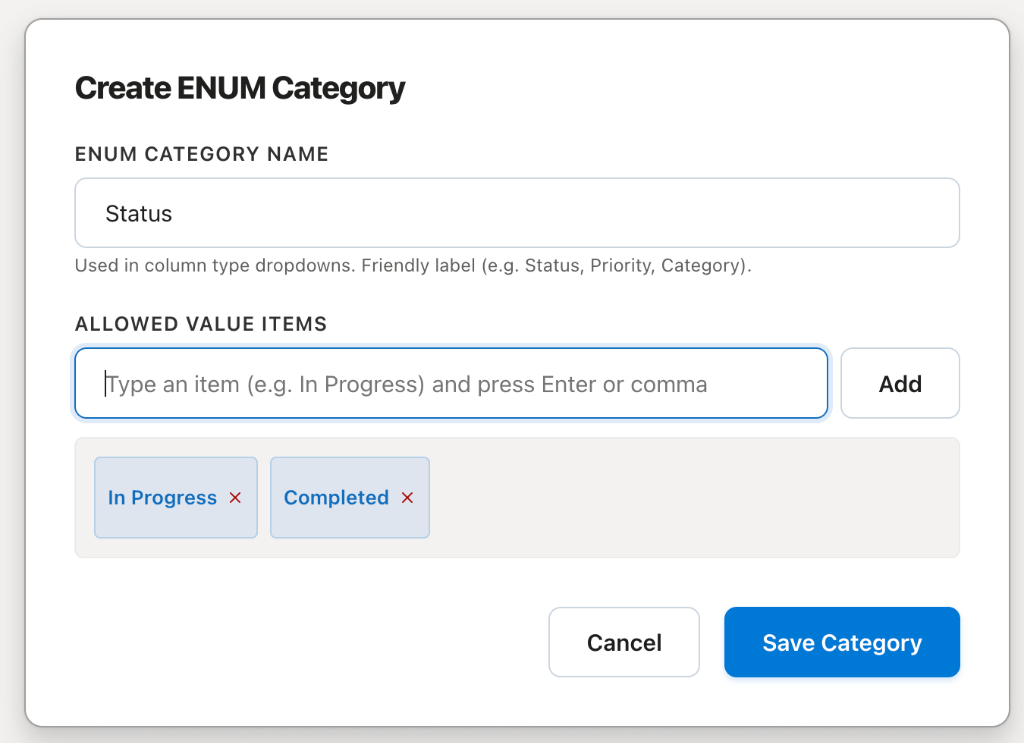
The ENUM Category is immediately available for use in any table within the workspace.
Using an ENUM Category
When creating or modifying a table, select ENUM as the column data type and choose the desired ENUM Category.
Users will then select values from a dropdown list instead of entering free-form text.
This ensures every record stores only valid, predefined values.
Example
ENUM Category: Project Status
- Draft
- Planning
- In Progress
- Completed
- Cancelled
Table Layout Sample
| Project Name | Status |
|---|---|
| CRM Portal | Planning |
| HR System | In Progress |
| Website | Completed |
Users cannot enter values outside the defined list, such as Started or Working, unless those values are explicitly added to the ENUM Category.
Common Use Cases
ENUM Categories are ideal for fields with a fixed set of values, including:
- Status
- Priority
- Department
- Country
- Gender
- Employee Type
- Payment Status
- Order Status
- Ticket Severity
- Leave Type
- Document Category
- Project Phase
Reusable Across Tables
One of the key advantages of ENUM Categories is reusability.
A single ENUM Category can be shared across multiple tables.
For example, the Status ENUM can be used in:
- Projects
- Tasks
- Purchase Orders
- Support Tickets
- Change Requests
Updating the ENUM Category automatically makes the new values available wherever it is used.
Benefits
Using ENUM Categories provides several advantages:
- Ensures consistent data across the application.
- Prevents spelling mistakes and duplicate values.
- Simplifies filtering, searching, and reporting.
- Reduces application-level validation logic.
- Reuses the same value set across multiple tables.
- Improves overall data quality and governance.