API Explorer
Interactive testing sandbox for your auto-generated API endpoints with custom payloads and query headers.
Overview
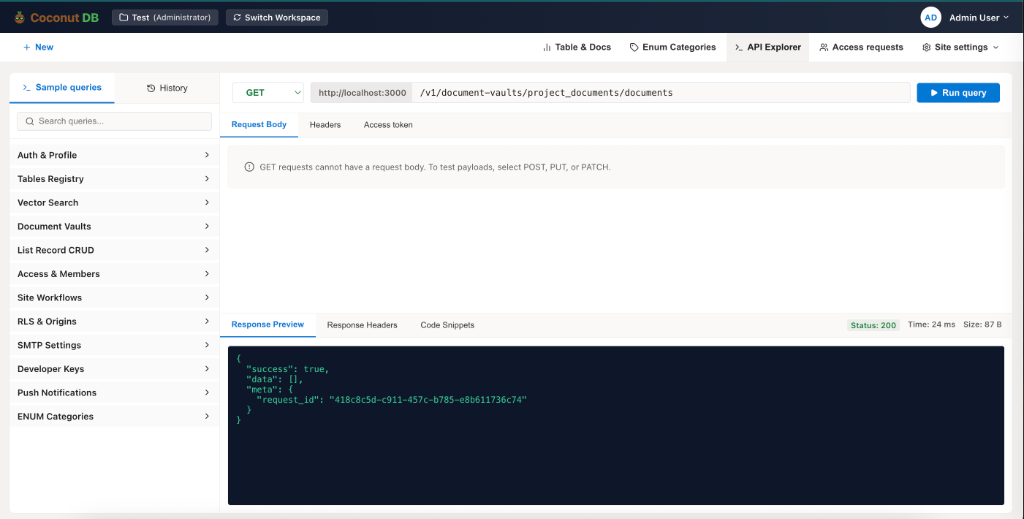
The API Explorer is an integrated API testing environment that allows developers to discover, test, and validate every REST API generated within their workspace.
Instead of switching to external tools such as Postman or cURL, developers can execute API requests directly from the CoconutDB interface. The API Explorer automatically provides endpoint documentation, request configuration, authentication support, response previews, and reusable code snippets.
It serves as a centralized playground for learning, testing, and integrating CoconutDB APIs during development.
Why Use API Explorer?
Every feature within CoconutDB automatically generates REST APIs.
The API Explorer allows developers to:
- Browse all available API endpoints.
- Test APIs without writing code.
- Validate request payloads before integration.
- Verify authentication and authorization.
- View response data instantly.
- Generate code snippets for multiple programming languages.
- Troubleshoot API requests during development.
This significantly reduces development time and simplifies API integration.
API Categories
The left navigation panel organizes APIs into logical categories, making it easy to locate the required endpoint.
Typical categories include:
- Authentication & Profile
- Tables Registry
- Vector Search
- Document Vaults
- Record CRUD Operations
- Access & Members
- Site Workflows
- Row-Level Security (RLS)
- SMTP Settings
- Developer Keys
- Push Notifications
- ENUM Categories
Each category expands to display the available REST endpoints.