Recycle Bin
Audit, review, and recover soft-deleted rows, schemas, and workspace attachments.
Overview
The Recycle Bin provides a safety net for accidentally deleted workspace resources. Instead of being removed permanently, supported resources are first moved to the Recycle Bin, allowing administrators to recover them when needed.
Currently, the Recycle Bin stores the following deleted resources:
- Database Tables
- Document Vaults
- Site Workflows
This helps prevent accidental data or configuration loss and provides administrators with an opportunity to restore important workspace assets.
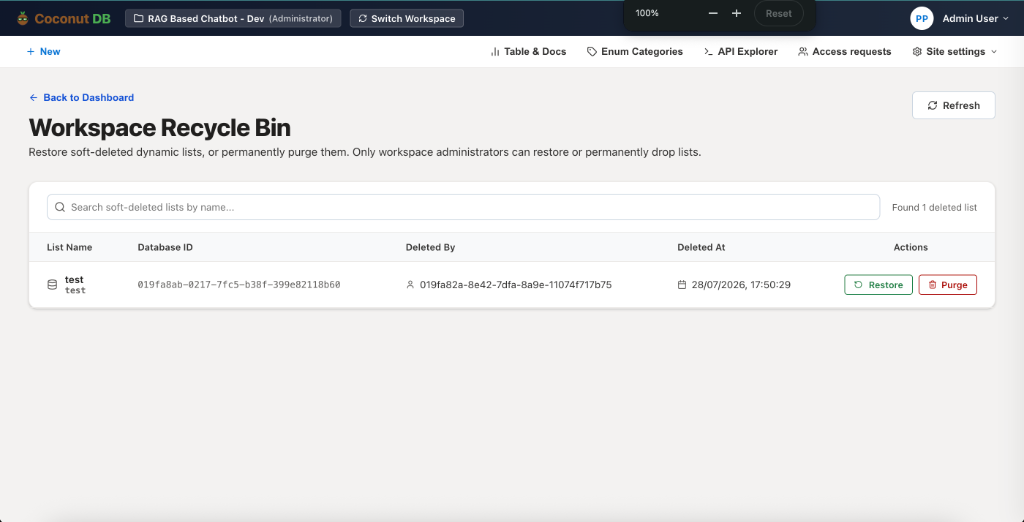
Deleted Resource List
The Recycle Bin displays all soft-deleted resources along with useful information, including:
- Resource Name – Name of the deleted table, document vault, or workflow.
- Database ID – Unique identifier of the deleted resource.
- Deleted By – The user who performed the deletion.
- Deleted At – Date and time when the resource was deleted.
A search box is also available to quickly locate deleted resources by name.
Restore Resource
Selecting Restore moves the resource back to its original location.
Once restored:
- The resource becomes available immediately.
- Existing configurations and metadata are preserved.
- Users with the appropriate permissions can continue using it as before.
This feature is useful when a resource has been deleted accidentally or needs to be recovered.
Permanently Delete (Purge)
If a deleted resource is no longer required, it can be permanently removed by selecting Purge.
A purged resource:
- Is permanently deleted from the workspace.
- Cannot be restored through the Recycle Bin.
- Frees workspace storage and removes the resource permanently.
Because this action is irreversible, it should only be performed when you are certain the resource is no longer needed.
Administrator-Only Access
For security and governance, only Workspace Administrators are permitted to permanently delete resources from the Recycle Bin.
This ensures that critical workspace assets cannot be permanently removed without administrative approval.